> ## Documentation Index
> Fetch the complete documentation index at: https://docs.lomaplatform.com/llms.txt
> Use this file to discover all available pages before exploring further.
# Restaurant365
> Get up and running with LOMA's integration with Restaurant365.
## Introduction
LOMA can automatically sync your sales data with Restaurant365.
It works by using R365's [OData API](https://docs.restaurant365.com/docs/restaurant365-odata-connector).
When configured, LOMA will pull and sync the available data on a daily basis.
## Setup Guide
### Granting Access
To give LOMA access to your data on Restaurant365, you'll need to create an account with access to their OData API.
Any active Restaurant365 user with the **Accounting Clerk** or **Full Access** role should have the necessary permissions.
Refer to their [documentation](https://docs.restaurant365.com/docs/restaurant365-odata-connector#authorized-users-r365-application) for more information.
### Finishing Up
Once you have a R365 account for LOMA to use, enable the integration:
1. Log in to your [LOMA](https://console.lomaplatform.com) account.
2. Navigate to **Settings -> Restaurant365**.
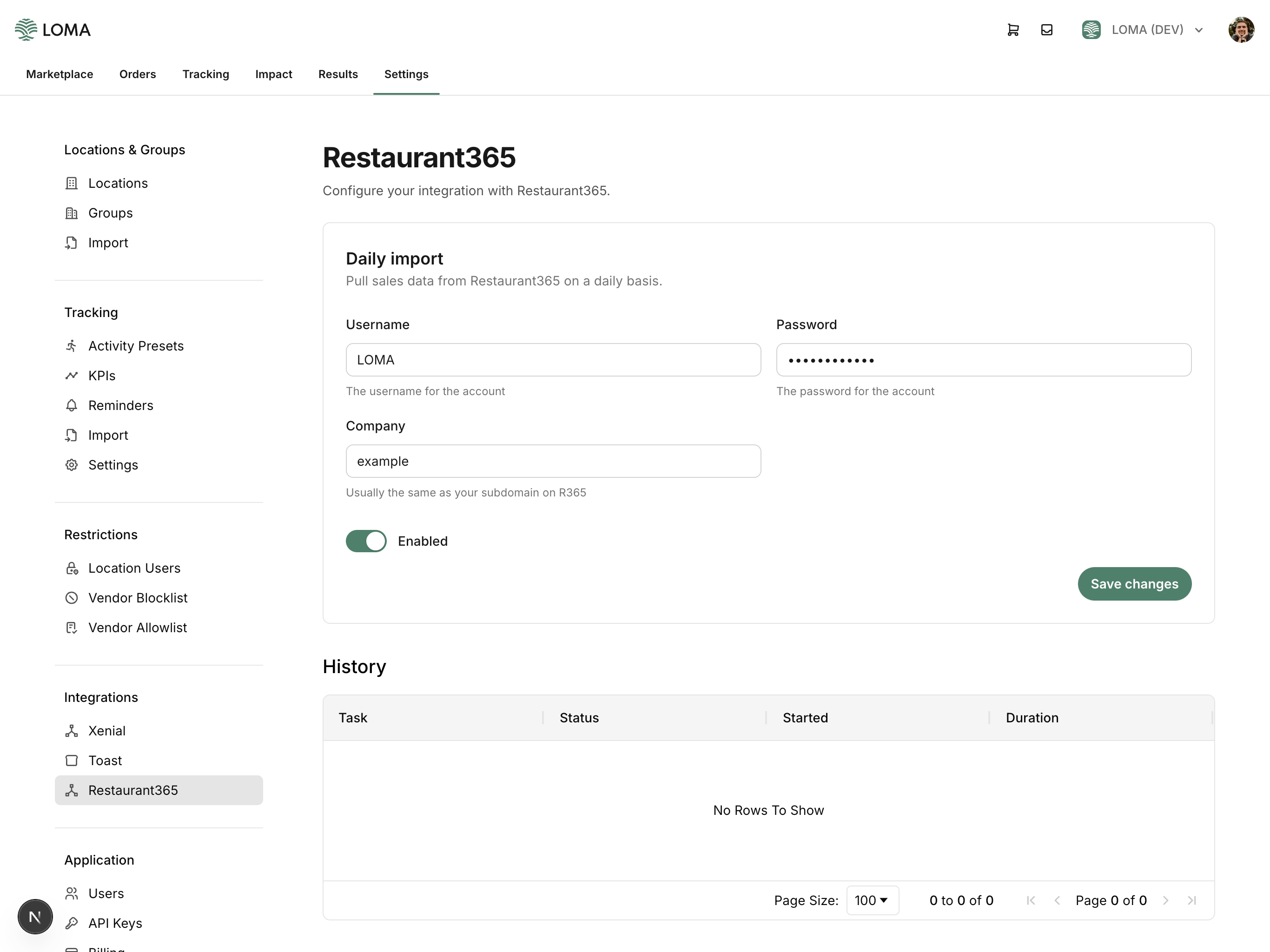
3. Enter your **username**, **password**, and **company** from Restaurant365.
4. Ensure **Enabled** is turned on and then click **Save**.
Your "company" on R365 is usually the same as your subdomain.
For example, if your subdomain is `example.restaurant365.com`, your company is `example`.
Once that's done, you're all set!
Sales data will start to flow through every day. This is not an immediate process, however.
Expect to wait at least a day before starting to see data in LOMA.
Your settings on LOMA should look like this:
 ## Notes
* Historical data will not be automatically synced.
Contact us if you would like to do a one-time pull for historical data.
* If you did not provide us with an internal identifier for your locations, the integration will not be able to automatically sync any data.
Contact us to work through mapping your locations between the two platforms.
## Need Help?
If you run into any issues with this process, refer to the [Restaurant365 documentation](https://docs.restaurant365.com/docs/restaurant365-odata-connector).
If you are still having issues, [contact us](mailto:support@lomaplatform.com).
## Notes
* Historical data will not be automatically synced.
Contact us if you would like to do a one-time pull for historical data.
* If you did not provide us with an internal identifier for your locations, the integration will not be able to automatically sync any data.
Contact us to work through mapping your locations between the two platforms.
## Need Help?
If you run into any issues with this process, refer to the [Restaurant365 documentation](https://docs.restaurant365.com/docs/restaurant365-odata-connector).
If you are still having issues, [contact us](mailto:support@lomaplatform.com).